
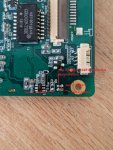
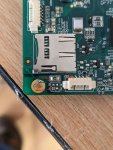
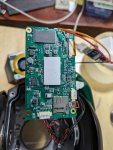
Всем привет, может быть кто-нибудь сможет пролить свет на мою проблему. У меня есть PTZ-камера Dahua SD49225T-HN-S2, которая со дня на день перестала работать, вошла в цикл перезагрузки и вернулась к заводскому IP 192.168.1.108. К сожалению, я не могу это исправить через TFTP. Она продолжает перезагружаться и соединение не может быть установлено. Я хочу найти порт UART камеры, но не могу его найти. Я нашел только эти единственные контакты, которые кажутся портом UART, но я не могу их подключить, поскольку на мониторе ничего не появляется при подключении питания к камере.
В камеру была загружена прошивка до того, как она перестала работать Firmware: 2.622.0000000.7.R,build:2018-04-04
что сделано до сих пор:
вот что получаю.
В заключение хотелось бы найти порт UART, чтобы знать, когда камера перезагружается. https://www.dahuacctv.com/threads/%D0%9 ... -v-2.1176/ кто-то на этом форуме написал, что "обычно рядное расположение уарта...камеры с "квадратным" расположением уарта подключаю через спец. интерфейсную плату и с таким расположением уарт не использую...поэтому сходу не подскажу..."
Вопрос, как найти порт UART?
В камеру была загружена прошивка до того, как она перестала работать Firmware: 2.622.0000000.7.R,build:2018-04-04
что сделано до сих пор:
- попробовал прошить эти прошивки
DH_SD-Mao-Rhea_MultiLang_PN_Stream3_IVS_V2.800.0000000.4.R.191105
DH_SD-Mao-Rhea_MultiLang_PN_Stream3_IVS_V2.800.1051002.0.R.201209
DH_SD-Mao-Rhea_EngSpnFrn_N_Stream3_IVS_V2.622.0000000.7.R.180404
DH_SD-Mao-Rhea_Eng_P_Stream3_IVS_V2.422.0000.1.R.20161130 DH_SD-Mao-Rhea_Eng_P_Stream3_IVS_V2.422.0000.2.R.20161118 - При включении питания проходит одна минута и 47 секунд, прежде чем камера перезагружается.
Код:
tftp 0x2000000 kernel.img; flwrite
tftp 0x2000000 partition-x.cramfs.img; flwrite
tftp 0x2000000 romfs-x.squashfs.img; flwrite
tftp 0x02000000 pd-x.squashfs.img; flwrite
tftp 0x2000000 user-x.squashfs.img; flwrite
tftp 0x2000000 custom-x.squashfs.img; flwrite
tftp 0x2000000 web-x.squashfs.img; flwrite
tftp 0x2000000 .FLASHING_DONE_STOP_TFTP_NOW
sleep 5
Код:
accepting requests..
Open TFTP Server MultiThreaded Version 1.64 Windows Built 2001

starting TFTP...
alias / is mapped to root\
permitted clients: all
server port range: all
max blksize: 65464
default blksize: 512
default timeout: 60
file read allowed: Yes
file create allowed: No
file overwrite allowed: No
thread pool size: 1
Listening On: 192.168.254.254:69
Client 192.168.1.108:1383 root\upgrade_info_7db780a713a4.txt, 1 Blocks Served
Client 192.168.1.108:1563 root\kernel.img, 1062 Blocks Served
Client 192.168.1.108:3277 root\partition-x.cramfs.img, 3 Blocks Served
Client 192.168.1.108:3863 root\romfs-x.squashfs.img, 930 Blocks Served
Client 192.168.1.108:2014 root\pd-x.squashfs.img, 34 Blocks Served
Client 192.168.1.108:2706 root\user-x.squashfs.img, 8050 Blocks Served
Client 192.168.1.108:2348 root\custom-x.squashfs.img, 17 Blocks Served
Client 192.168.1.108:3000 root\web-x.squashfs.img, 4230 Blocks Served
Client 192.168.1.108:2096 root\.FLASHING_DONE_STOP_TFTP_NOW, 1 Blocks Served
Client 192.168.1.108:1401 root\success.txt, File not found or No Access

***********
Ncat: Version 7.40 ( https://nmap.org/ncat )
Ncat: Listening on 192.168.254.254:5002
gBootLogPtr:00b80008.
NAND: 128 MiB
amb_nand_read_oob read page:49152 err
partition file version 2
rootfstype squashfs root /dev/mtdblock8
fail to load bootargsParametersV2.txt
fail to load bootargsParametersV2.txt
fail to init bootargsParametersV2
TEXT_BASE:01000000
Net: Detected MACID:38:af:29:b1:39:48
PHY:0x001cc816,addr:0x00
PHY:0x001cc816,addr:0x00
phy RTL8201 init
Using ambarella mac device
TFTP from server 192.168.254.254; our IP address is 192.168.1.108; sending through gateway 192.168.1.1Download Filename 'upgrade_info_7db780a713a4.txt'.Download to address: 0x5000000
Downloading: *
done
Bytes transferred = 420 (1a4 hex)
Using ambarella mac device
TFTP from server 192.168.254.254; our IP address is 192.168.1.108; sending through gateway 192.168.1.1Download Filename 'kernel.img'.Download to address: 0x2000000
Downloading: *
done
Bytes transferred = 1558898 (17c972 hex)
Erasing update flag partition.

## Checking Image at 02000000 ...
Legacy image found
Image Name: kernel
Created: 2016-11-18 11:23:17 UTC
Image Type: ARM Linux Firmware (uncompressed)
Data Size: 1558834 Bytes = 1.5 MiB
Load Address: 00c80000
Entry Point: 01200000
Verifying Checksum ... OK
Programing start at: 0x00c80000
write : 100%
done
Using ambarella mac device
TFTP from server 192.168.254.254; our IP address is 192.168.1.108; sending through gateway 192.168.1.1Download Filename 'partition-x.cramfs.img'.Download to address: 0x2000000
Downloading: *
done
Bytes transferred = 4160 (1040 hex)
Erasing update flag partition.

## Checking Image at 02000000 ...
Legacy image found
Image Name: partition
Created: 2016-11-18 11:23:16 UTC
Image Type: ARM Linux Standalone Program (uncompressed)
Data Size: 4096 Bytes = 4 KiB
Load Address: 00500000
Entry Point: 00600000
Verifying Checksum ... OK
Programing start at: 0x00500000
write : 100%
done
Using ambarella mac device
TFTP from server 192.168.254.254; our IP address is 192.168.1.108; sending through gateway 192.168.1.1Download Filename 'romfs-x.squashfs.img'.Download to address: 0x2000000
Downloading: *
done
Bytes transferred = 1364032 (14d040 hex)
Erasing update flag partition.

## Checking Image at 02000000 ...
Legacy image found
Image Name: romfs
Created: 2017-03-08 6:21:19 UTC
Image Type: ARM Linux Standalone Program (gzip compressed)
Data Size: 1363968 Bytes = 1.3 MiB
Load Address: 01200000
Entry Point: 01600000
Verifying Checksum ... OK
Programing start at: 0x01200000
write : 100%
done
Using ambarella mac device
TFTP from server 192.168.254.254; our IP address is 192.168.1.108; sending through gateway 192.168.1.1Download Filename 'pd-x.squashfs.img'.Download to address: 0x2000000
Downloading: *
done
Bytes transferred = 49216 (c040 hex)
Erasing update flag partition.

## Checking Image at 02000000 ...
Legacy image found
Image Name: pd
Created: 2016-11-18 11:23:36 UTC
Image Type: ARM Linux Standalone Program (uncompressed)
Data Size: 49152 Bytes = 48 KiB
Load Address: 00940000
Entry Point: 00c80000
Verifying Checksum ... OK
Programing start at: 0x00940000
write : 100%
done
Using ambarella mac device
TFTP from server 192.168.254.254; our IP address is 192.168.1.108; sending through gateway 192.168.1.1Download Filename 'user-x.squashfs.img'.Download to address: 0x2000000
Downloading: *
done
Bytes transferred = 11817024 (b45040 hex)
Erasing update flag partition.

## Checking Image at 02000000 ...
Legacy image found
Image Name: user
Created: 2017-08-22 11:50:07 UTC
Image Type: ARM Linux Standalone Program (gzip compressed)
Data Size: 11816960 Bytes = 11.3 MiB
Load Address: 01e00000
Entry Point: 03b80000
Verifying Checksum ... OK
Programing start at: 0x01e00000
write : 100%
done
Using ambarella mac device
TFTP from server 192.168.254.254; our IP address is 192.168.1.108; sending through gateway 192.168.1.1Download Filename 'custom-x.squashfs.img'.Download to address: 0x2000000
Downloading: *
done
Bytes transferred = 24640 (6040 hex)
Erasing update flag partition.

## Checking Image at 02000000 ...
Legacy image found
Image Name: custom
Created: 2016-11-18 11:23:37 UTC
Image Type: ARM Linux Standalone Program (uncompressed)
Data Size: 24576 Bytes = 24 KiB
Load Address: 00600000
Entry Point: 00940000
Verifying Checksum ... OK
Programing start at: 0x00600000
write : 100%
done
Using ambarella mac device
TFTP from server 192.168.254.254; our IP address is 192.168.1.108; sending through gateway 192.168.1.1Download Filename 'web-x.squashfs.img'.Download to address: 0x2000000
Downloading: *
done
Bytes transferred = 6209600 (5ec040 hex)
Erasing update flag partition.

## Checking Image at 02000000 ...
Legacy image found
Image Name: web
Created: 2016-11-18 11:23:18 UTC
Image Type: ARM Linux Standalone Program (uncompressed)
Data Size: 6209536 Bytes = 5.9 MiB
Load Address: 01600000
Entry Point: 01e00000
Verifying Checksum ... OK
Programing start at: 0x01600000
write : 100%
done
Using ambarella mac device
TFTP from server 192.168.254.254; our IP address is 192.168.1.108; sending through gateway 192.168.1.1Download Filename '.FLASHING_DONE_STOP_TFTP_NOW'.Download to address: 0x2000000
Downloading: *
done
partition file version 2
rootfstype squashfs root /dev/mtdblock8
fail to load bootargsParameters.txt
fail to load bootargsParameters.txt file
get bootargs info failed
cmdLine console=ttyS0,115200 mem=150M root=/dev/mtdblock8 rootfstype=squashfs init=/linuxrcВопрос, как найти порт UART?
Вкладення
-
 341.2 КБ Перегляди: 19
 -
 310 КБ Перегляди: 18
 -
 201.3 КБ Перегляди: 19